
Shoplazza Accounts is a one-stop global fund management account that Shoplazza offers to merchants. Within a single dashboard, merchants can handle global collection, cross-border payout, currency exchange, virtual card issuing, and CNY settlement, along with multi-currency balance management—covering the complete fund flow from collecting, holding, and exchanging to paying out, and helping merchants run their global business more efficiently.
What is Shoplazza Accounts
Shoplazza Accounts (hereinafter referred to as the "Account") is a global fund account system integrated into the Shoplazza admin. After onboarding and completing identity verification, merchants receive a multi-currency account for centrally managing global fund flows:
- Collect: Receive funds from e-commerce platforms, acquiring institutions, and other channels through Global Accounts.
- Hold: Hold balances in multiple currencies and view your fund distribution in one place.
- Exchange: Exchange between different currencies at real-time rates.
- Pay: Pay recipients worldwide via local clearing networks or SWIFT international remittance.
Path: Shoplazza admin Finances > Shoplazza Accounts.
Use cases
Shoplazza Accounts is suited to the following global fund management scenarios:
- Receiving sales proceeds from e-commerce platforms and acquiring institutions;
- Paying overseas suppliers for goods, logistics and warehousing, and operating expenses;
- Paying for advertising, marketing, or platform service fees;
- Exchanging between multiple currencies to optimize cash flow and hedge exchange-rate risk;
- Issuing virtual cards with independent spending control for ad campaigns, subscriptions, cloud services, and more;
- Settling overseas income into CNY to domestic accounts in compliance with regulations;
- Transferring funds internally within the company and across borders.
Core feature modules
| Module | Description | Admin entry |
| Overview | A one-stop dashboard that centrally displays your account balance, issued cards, collection statistics, Global Accounts, and quick-action entries. | Overview |
| Balance | View available balance, pending pay-in, and pending pay-out for each currency, along with all transaction details. | Balance |
| Global Accounts | Apply for and manage local collection accounts to receive global payments just like local transfers, and link your stores. | Global Accounts |
| Collection | View incoming records, settlement amounts, and status, and submit supporting documents as needed to complete compliance review. | Collection |
| Payout | Use your account balance to pay business or individual recipients worldwide via local clearing networks or SWIFT, and manage your recipients. | Payout |
| Foreign Exchange | Exchange between multi-currency accounts in real time with locked rates—what you see is what you get, available 24/7. | Foreign Exchange |
| Issuing (Virtual Cards) | Instantly issue virtual cards by use case for global online payments such as ads, subscriptions, and cloud services, with support for top-ups, refunds, and limit management. | Issuing |
| CNY Settlement | Link stores to declare settlement quotas, create CNY recipients, and settle overseas funds to domestic bank accounts in near real time. | CNY Settlement |
| Settings | Set or update your 6-digit transaction password and configure preferences such as the refund currency for failed payouts. | Settings |
Supported payout methods
The system automatically matches the available payout methods based on the recipient's country or region, receiving currency, and bank details—merchants do not need to select a clearing network manually.
Local clearing networks
| Region | Supported currencies | Clearing network | Estimated arrival |
| Hong Kong, China | CNH, EUR, HKD, USD | FPS, RTGS | T+0 to 1 |
| The United States and select countries or regions | USD | ACH and local payment networks | T+1 to 2 |
| Eurozone | EUR | SEPA | T+0 to 1 |
| United Kingdom | EUR, GBP | SEPA, Fast Payment | T+0 to 1 |
SWIFT international remittance
- Supported arrival currencies: USD, AUD, CAD, SGD, GBP, EUR, JPY, HKD, CNH
- Supported payout countries or regions: 200+
- Estimated arrival time: T+0 to 3
The actual supported payout methods, currencies, and estimated arrival times are subject to the results displayed on the admin page.
Prerequisites
Before using the service for the first time, please make sure you have completed the following preparations:
1. Onboard your account and complete identity verification (KYC/KYB): Submit materials based on your entity type (business or individual) and pass the review.
2. Set your transaction password: In "Settings," set a 6-digit numeric transaction password used to authenticate fund operations such as payouts, exchanges, and card issuing.
3. Link stores (as needed): Link your Shoplazza or other-platform stores to the account for collection, settlement quota calculation, and more.
Fund operations (payouts, exchanges, card top-ups, and so on) all require verification via your 6-digit transaction password. Please keep your password safe; multiple incorrect entries will temporarily lock your account.
Fund security
- All fund operations require transaction password verification, and critical operations (such as payouts and exchanges) display confirmation information and require a second confirmation before submission.
- Once submitted, a payout enters the financial institution's clearing process and cannot be cancelled or modified, so please review carefully before submitting.
- Some transactions may trigger a compliance review (RFI, Request for Information). When this happens, you will need to submit additional materials as prompted, and the transaction will continue processing once the review is approved.
Home dashboard operations and entries
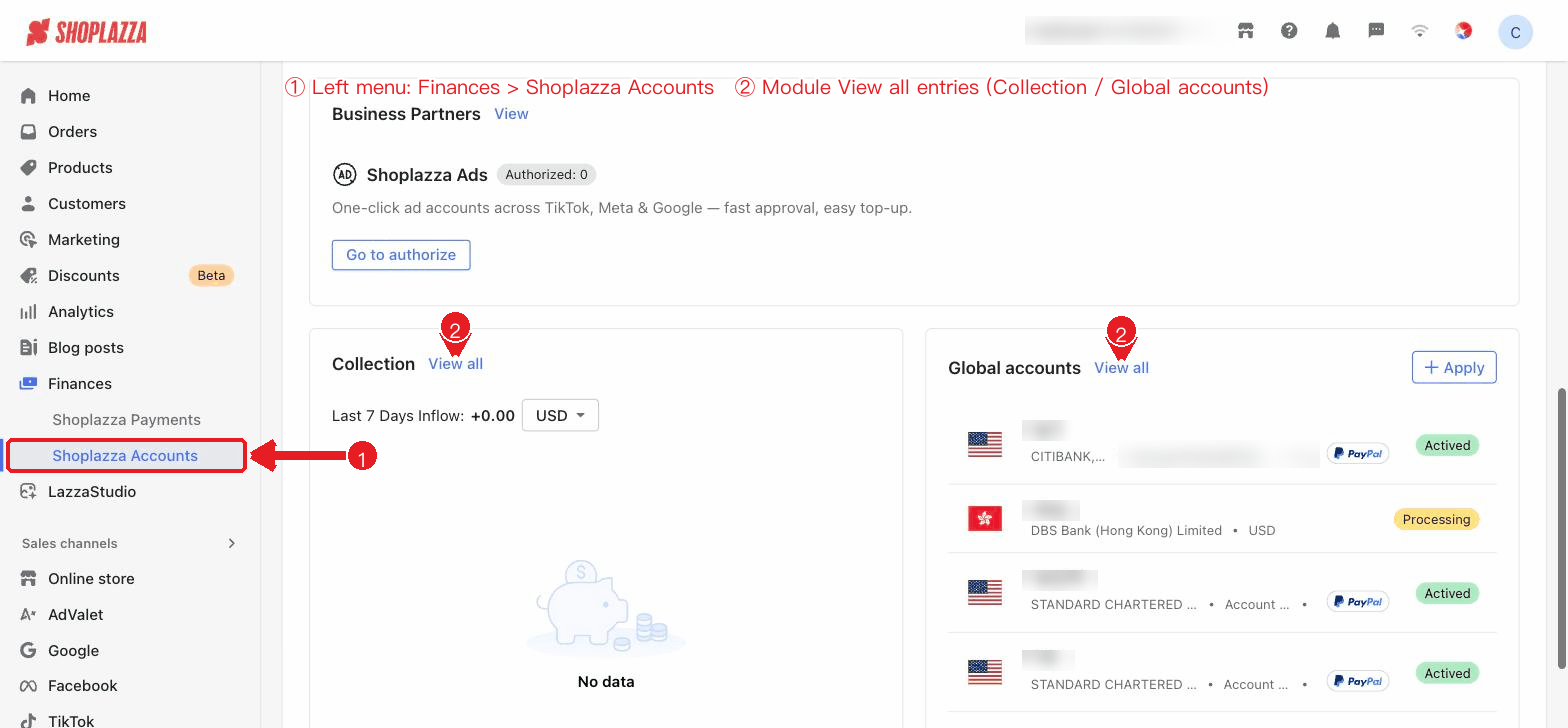
On the Overview (home) dashboard shown after entering Finances > Shoplazza Accounts, the blocks and entries are as follows (displayed dynamically based on the permissions your account has enabled):
Figure: Overview home · Balance and issuing summary
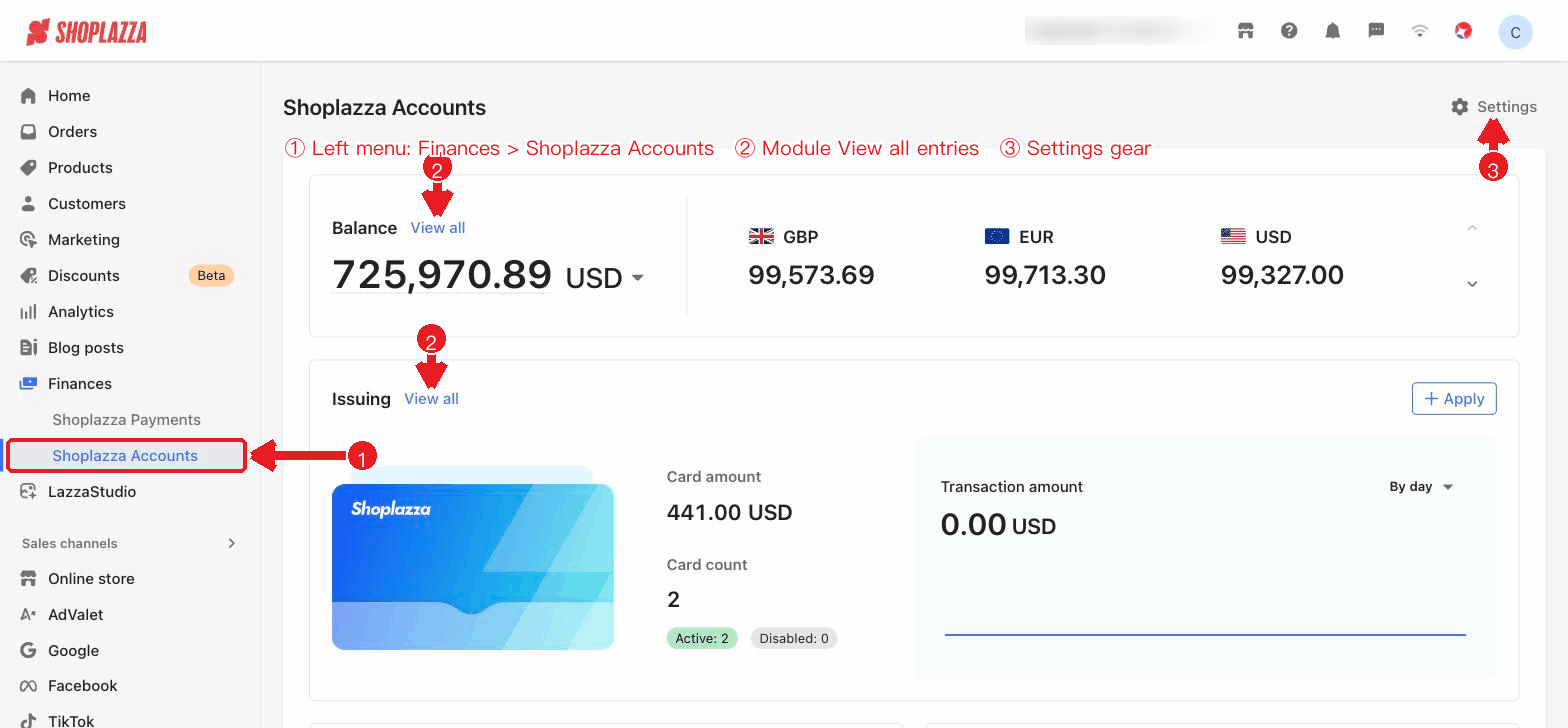
| Block / Entry | Function |
| Settings (top right) | Opens the Settings page (transaction password and payout preferences). |
| Balance · View all | Displays your total account balance and the balance for each currency; click "View all" to open the Balance page. |
| Issuing · View all / Apply | Displays virtual card balance, card count, and transaction amount; "View all" opens the Issuing page, and "Apply" starts the card application flow; on first use, an issuing introduction and "Apply now" are shown. |
| Quick access: Payout / Foreign Exchange / CNY Settlement | Click a card to go to the Payout, Foreign Exchange, or CNY Settlement page respectively. |
| Collection · View all | Displays the last 7 days of incoming statistics and new collection reminders; click to open the collection list. |
| Global Accounts · Apply / Create global account | Compactly displays your existing Global Accounts; when you have none, it prompts "Apply your first global account," which opens the application page when clicked. |
| Onboarding guide | An operation guide (quick access, quick GA application) appears automatically on your first visit; click "Next/Done" to close it. |
Figure: Quick access · Payout/FX/Settlement, service providers, collection, and Global Accounts
Next steps
After getting an overall understanding of the product, we recommend continuing in the following order:


Comments
Please sign in to leave a comment.