
Foreign Exchange lets you exchange between multi-currency accounts in real time with the rate locked in — what you see is what you get — available 24/7. The system provides real-time exchange rates to help you optimize cash flow, seize favorable timing, and hedge against exchange-rate risk.
When would you use Foreign Exchange?
You use Foreign Exchange whenever the currency you hold in your account differs from the currency you need to use, so you first convert your balance into the target currency. Common scenarios include:
- Mismatched receiving and paying currencies: for example, you received funds in USD but need to pay a European supplier in EUR or a local carrier in GBP, or you need to convert to CNH for CNY settlement / withdrawal.
- Funding a card in a specific currency: topping up a shared or regular card requires the matching currency (for example, a U.S. card requires USD), so you convert your balance into the card's currency before funding it.
- Seizing favorable rates and hedging risk: when you expect a currency to strengthen or weaken, lock in the rate ahead of time at a favorable moment to fix your costs and avoid losses from rate fluctuations while holding the balance.
- Multi-currency cash management: move funds flexibly between your currency accounts, consolidating scattered multi-currency balances into a single currency to simplify payments and cash-flow management.
Transaction specifications
| Dimension | Specification |
| Transaction mode | Executed at the real-time exchange rate: the rate is locked in instantly at the market rate at the moment of submission and settled immediately. Limit orders, forward contracts, and other delayed transactions are not supported. |
| Supported currencies | Any-to-any exchange among 9 major currencies: USD, AUD, CAD, SGD, GBP, EUR, JPY, HKD, and CNH (you must have opened an account in the corresponding currency; you can first receive funds through a Global Account). |
| Minimum exchange amount | From the equivalent of USD 0.01 per transaction, with no upper limit. |
Initiate a currency exchange
1. Open the Foreign Exchange page: go to Finances > Shoplazza Accounts > Foreign Exchange.
2. Select the sell and buy currencies: under You sell, choose the source currency (the available balance is shown); under You buy, choose the target currency.
3. Enter the amount: enter either the sell or buy amount, and the system automatically converts the other side and displays the real-time exchange rate and its update time (the rate refreshes periodically).
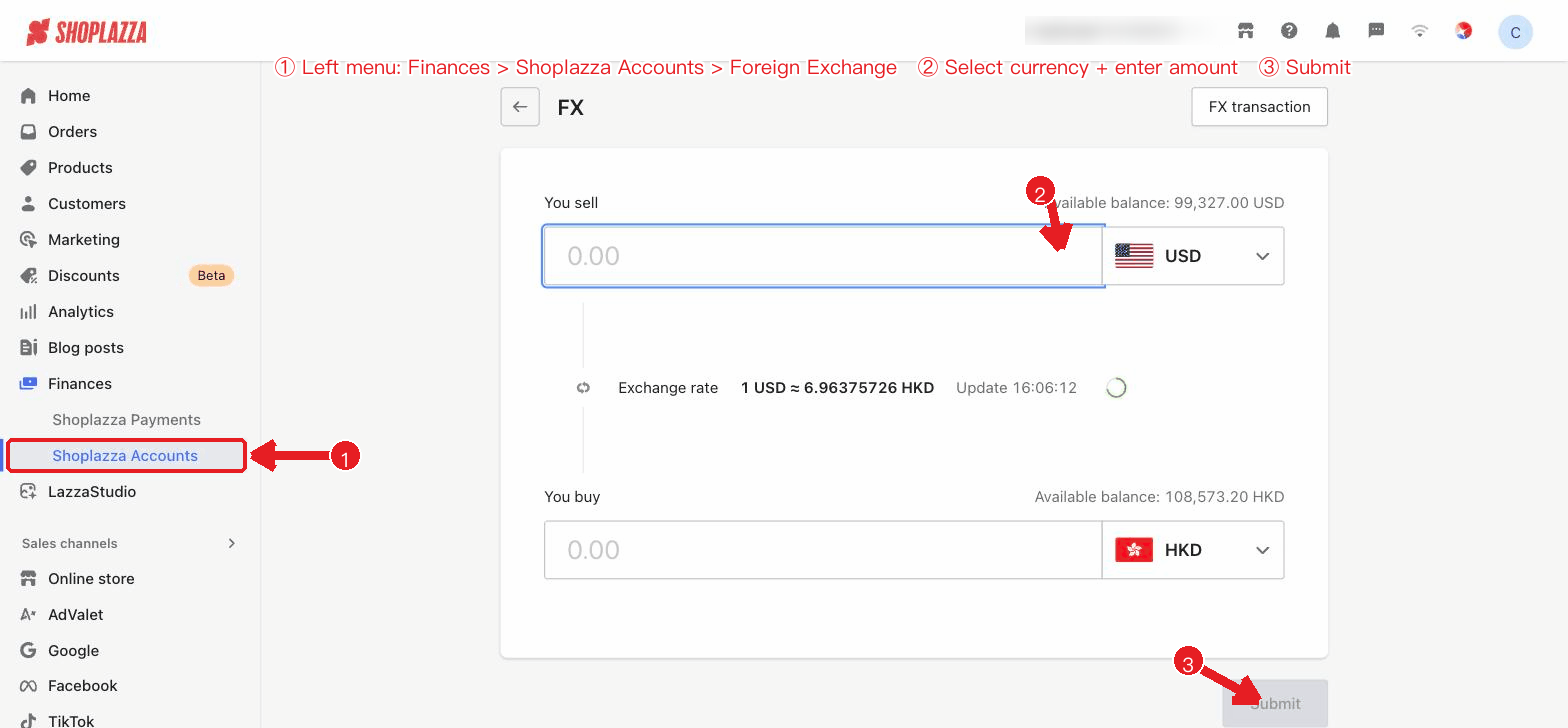
4. Confirm and submit: click Submit, review the sell/buy amounts, exchange rate, and fee in the confirmation dialog, and enter your 6-digit transaction password to complete the exchange.
Note
The exchange rate fluctuates with the market in real time. The rate shown before confirmation is for reference only; once locked in, the rate at the moment of confirmation applies. If you have not set a transaction password yet, please go to "Settings" to set one first.
Rate lock-in confirmation and exchange result
After you click "Submit," the system displays a rate lock-in confirmation dialog (Lock in your exchange rate): it shows the locked-in rate with a countdown, the You sell / You buy amounts, and a note that "Once confirmed, the exchange cannot be canceled." Enter your 6-digit transaction password and click Confirm to complete the exchange.
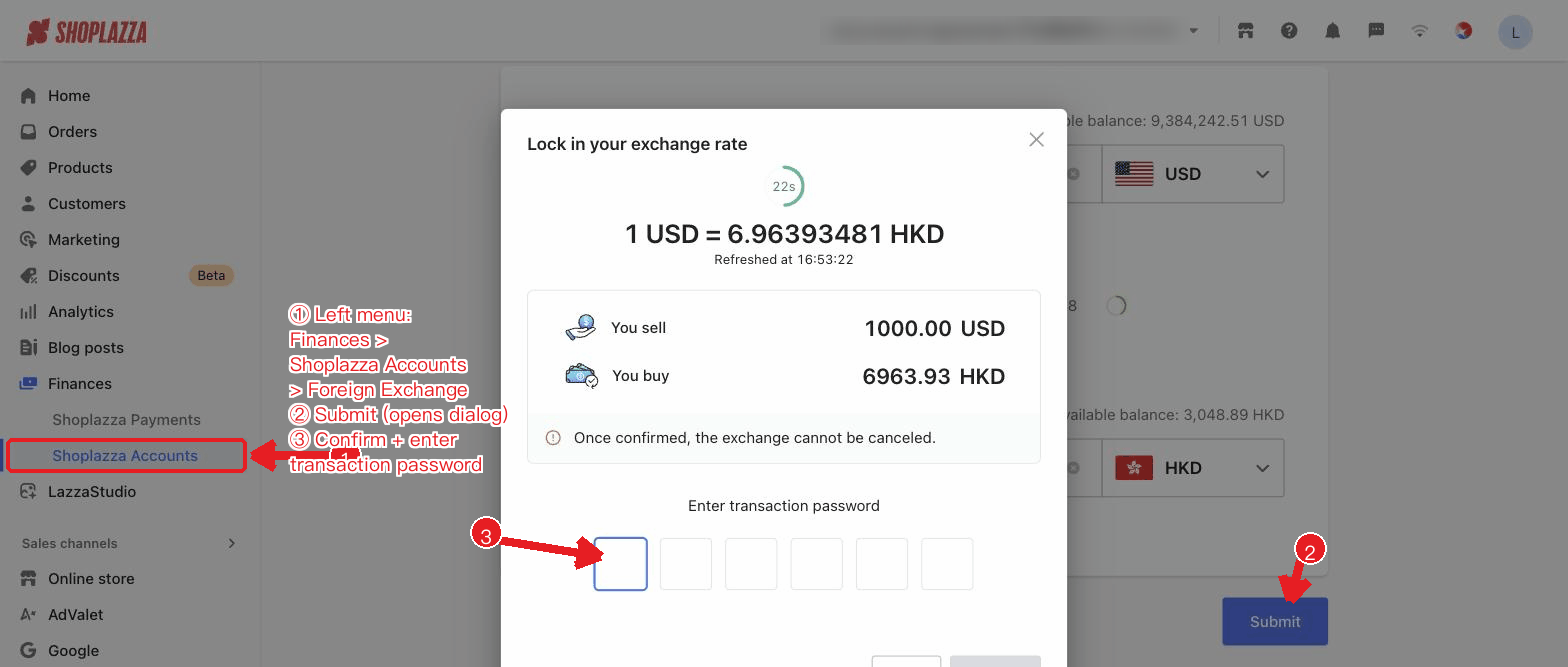
After the exchange is submitted, the result page and the transaction number are displayed.
View exchange records
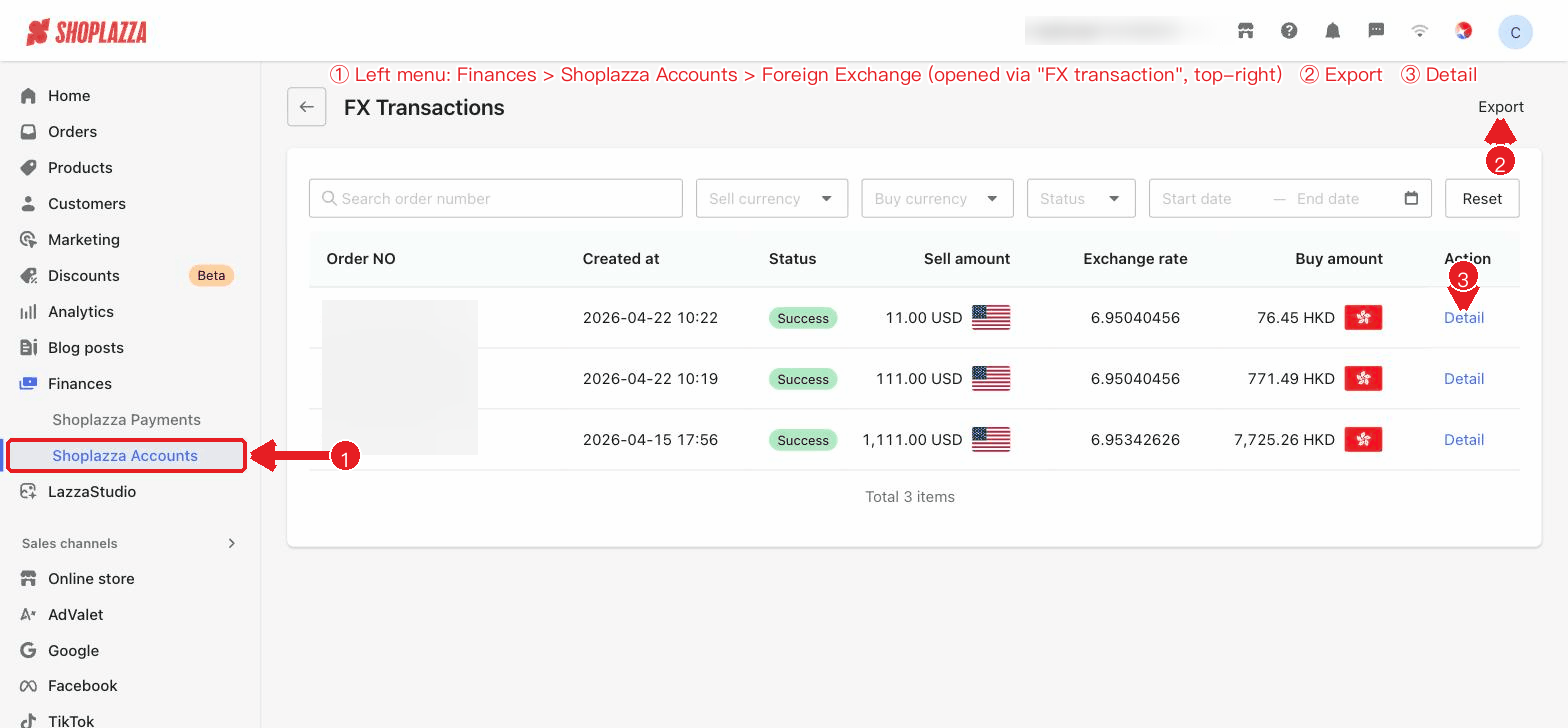
Click FX transaction in the top-right corner to open FX Transactions, where you can view your historical exchange transactions. You can check order number, created at, status, sell amount, Exchange rate, buy amount, and action (details). You can search by order number, filter by sell/buy currency, status, and date, and export the records.
| Status | Description |
| Processing | The exchange is being processed. |
| Success | The exchange is complete. |
| Failed | The exchange was not successful; view the details to learn the reason. |
Interface actions and buttons
| Button / control | Location | Function |
| FX transaction | Top-right corner of the exchange page | Opens the FX Transactions list. |
| You sell (amount + currency dropdown) | Exchange page | Enter the sell amount and select the source currency; the available balance for that currency is shown on the right. |
| You buy (amount + currency dropdown) | Exchange page | Enter or auto-convert the buy amount and select the target currency. |
| Rate refresh (icon/countdown) | Middle of the exchange page | The real-time exchange rate refreshes periodically, showing the update time and countdown. |
| Submit | Bottom of the exchange page | Opens the confirmation dialog; after review, enter your 6-digit transaction password to complete the exchange. |
| Search / Sell currency / Buy currency / Status / Date | Filter bar on the records page | Search by order number and filter by sell/buy currency, status, and date. |
| Reset / Export | Records page | Clear filters / export the exchange records. |
| Details (row action) | Action column on the records page | Opens the exchange details drawer, where fields can be copied. |


Comments
Please sign in to leave a comment.