
This article answers the most frequently asked questions about using Seel Worry-Free Purchase.
Q1: How is Seel displayed on my website?
A: Seel is presented in your store as a virtual product.
Q2: Will the Seel virtual product be affected by my store's discounts?
A: Since Seel is presented as a virtual product in your store, it will be included in promotions if the discount applies to that product. We recommend excluding the Seel virtual product when configuring promotional campaigns.
Currently, all marketing campaigns support excluding the Seel virtual product by specifying the applicable products, except for order-level discounts in the Discounts module and shipping discounts, which do not support excluding the Seel virtual product.
Q3: How is the price of the Seel virtual product calculated?
A: Since Seel is billed as a virtual product in Shoplazza stores, the displayed premium is estimated based on the order value multiplied by the applicable premium rate, then matched to the corresponding pricing tier. As a result, there may be a slight difference between the estimated and actual premium, which is typically kept within two decimal places.
Q4: How do I configure the fulfillment mode for the Seel virtual product?
A: After a customer purchases Seel, it will appear as a product in the order list. You need to configure how the Seel virtual product is fulfilled. If no fulfillment mode is set, the order may remain in a Partially Fulfilled status.
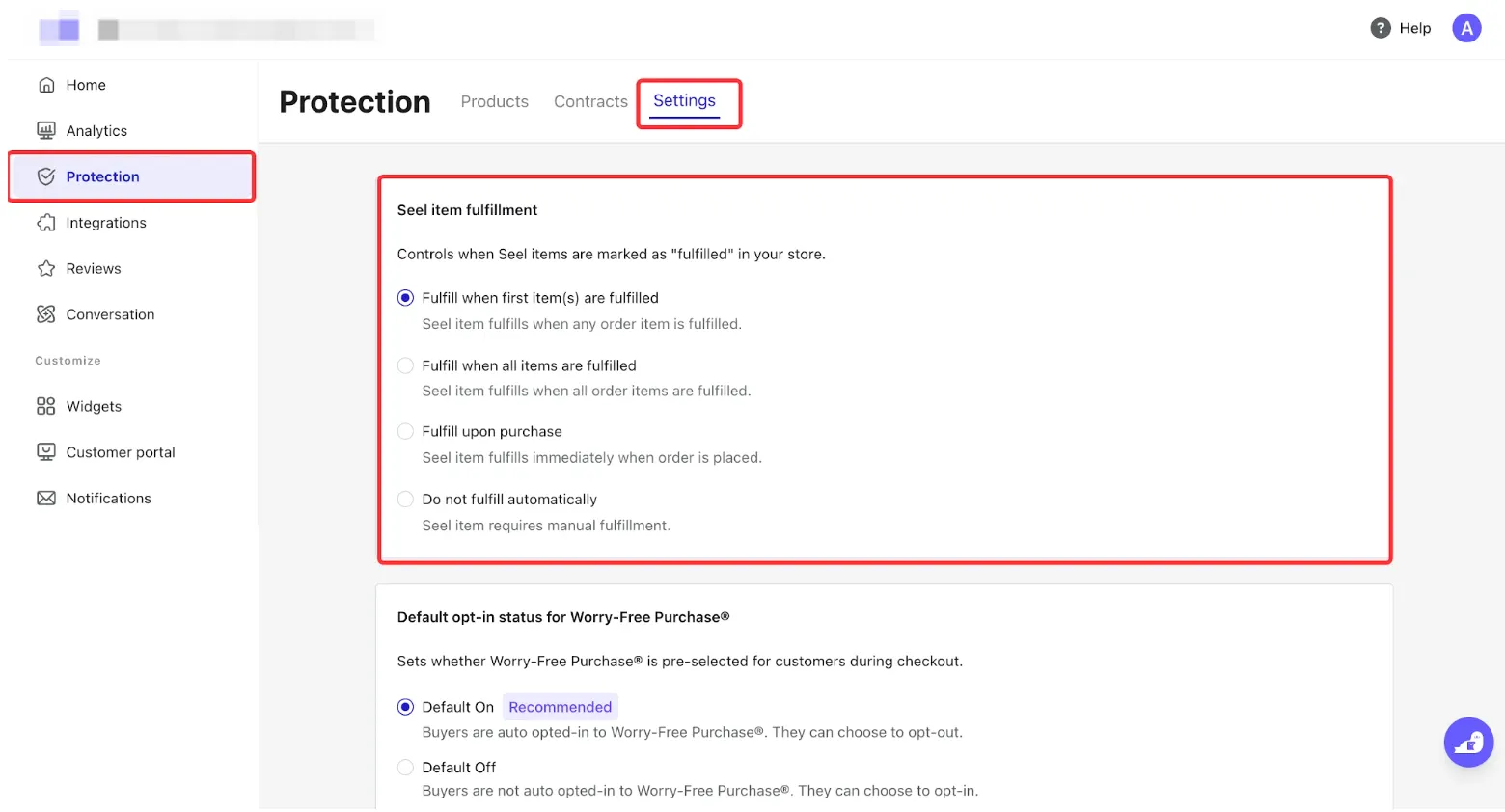
1. You can configure the fulfillment mode in the Seel dashboard. We recommend selecting Fulfill when first item(s) are fulfilled.
Available fulfillment options:
- Fulfill when the first item(s) are fulfilled: Protection is fulfilled when the first item in the order is fulfilled. (Recommended)
- Fulfill when all items are fulfilled: Protection is fulfilled only after all items in the order have been fulfilled.
- Fulfill upon purchase: The protection is fulfilled immediately after the purchase is completed.
- Do not fulfill automatically: Seel item requires manual fulfillment.
2. If the Seel virtual product is incompatible with your ERP system (for example, some ERP systems do not support fulfilling virtual products without logistics information), we recommend contacting your ERP provider to confirm how virtual product orders should be processed.
Q5: How does the Seel protection fee settlement process work?
- Fee collection: The protection fee paid by the customer is collected together with the order payment and deposited into your account.
- Periodic settlement: Seel generates and sends protection fee invoices to merchants based on the agreed billing cycle. By default, billing is processed weekly.
- Automatic payment: The settlement account you have linked will be automatically charged for the amount due, and the protection fees will be remitted to Seel.
Q6: Can customers purchase Seel after placing an order?
A: No. Seel must be purchased together with the original order. It cannot be added later or purchased on the customer's behalf by the merchant.
Q7: Can customers request a refund for Seel after the order has been shipped?
A: No. Once the order has been shipped, Seel coverage becomes effective immediately and is no longer eligible for a refund.
Q8: How can I prevent the Seel virtual product from appearing in product recommendations?
A: If you are using the built-in Product Recommendation section in your theme, recommendations are generated automatically by the algorithm, and the Seel virtual product cannot be excluded.
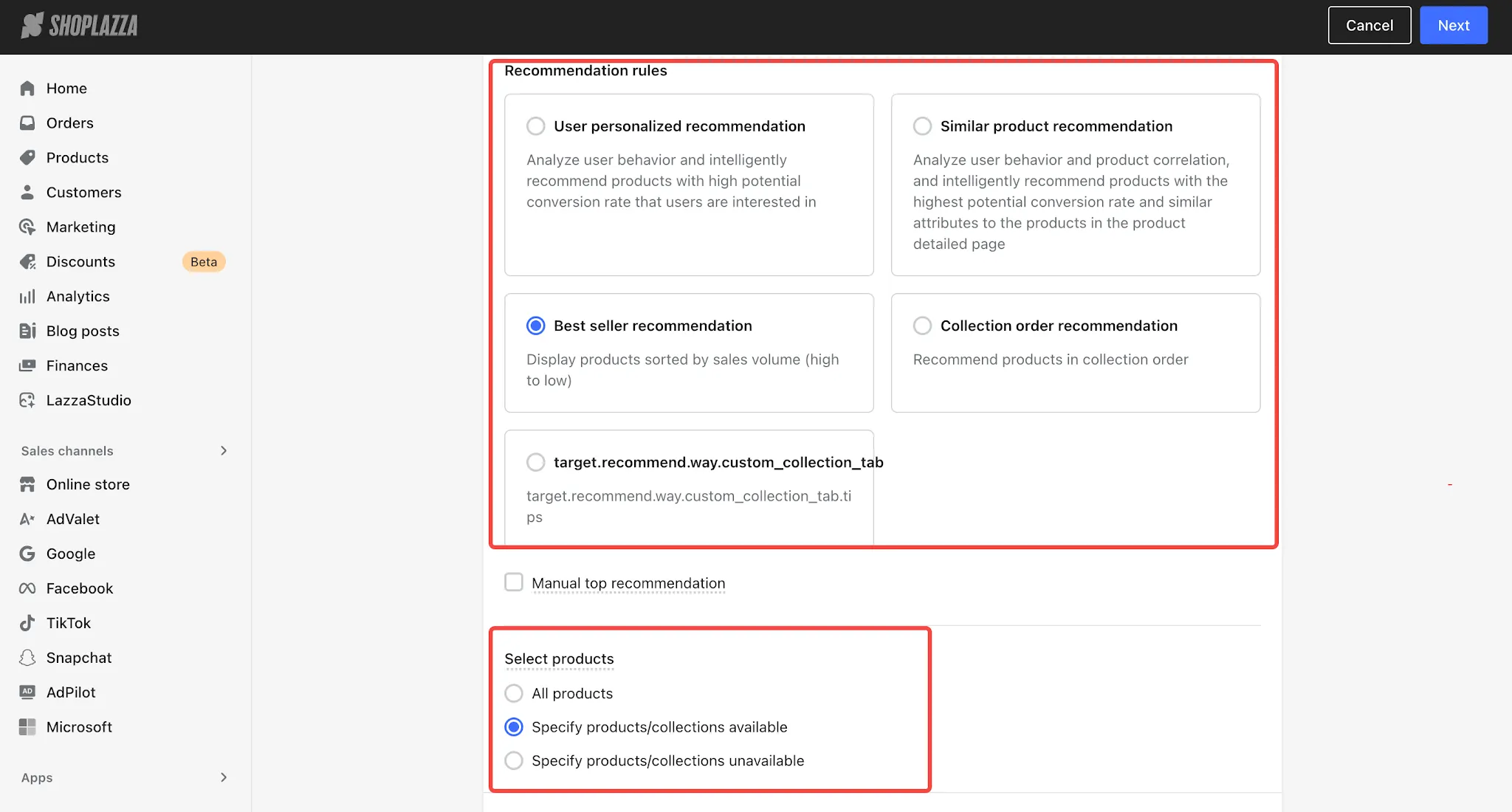
If you are using the Intelligent product recommendation app, you can exclude the Seel virtual product by marking it as unavailable for recommendations or configure the app to recommend only selected products.
Q9: How can I prevent the Seel virtual product from appearing in my advertisements?
A: Advertising platforms such as Google, Facebook, and TikTok may automatically sync and use your product feed. To prevent the Seel virtual product from being included in your ads, you should manually exclude it in the advertising platform's product catalog or campaign settings. This helps ensure your ad campaigns display only your actual products and avoid affecting advertising performance.
Q10: What types of bank cards are supported in the Seel dashboard?
A: Seel currently supports most major credit cards, including American Express (Amex), Mastercard, Visa, and Discover. If you encounter any issues while adding a payment card, please contact Customer Support for assistance.


Comments
Please sign in to leave a comment.